
on way - Jens
About the Lilygo ESP32 S3 T-Display board
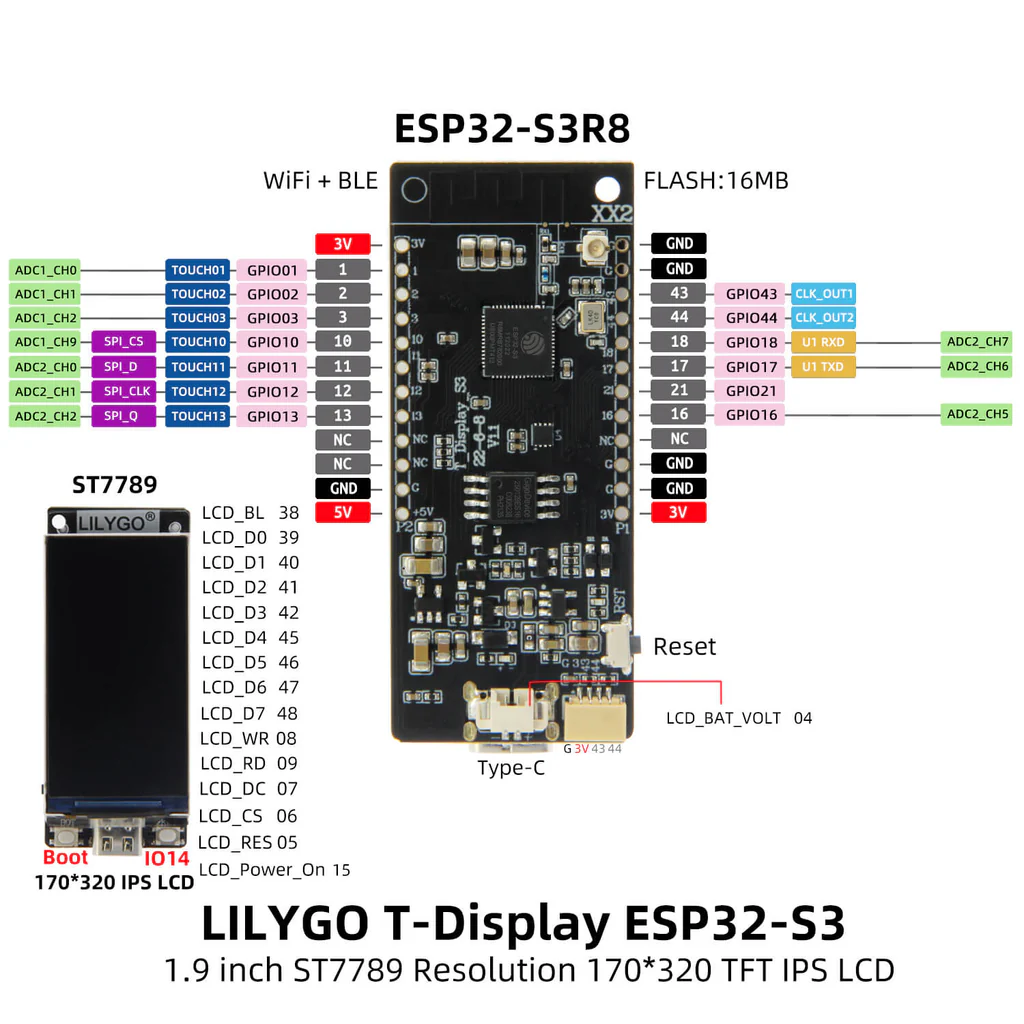 |
ESP32 S3 duo core 240MHz
1.9" 170x240 pixels OLED color
16 MB Flash, 8 MB PSRAM
On image below upper left is 0,0 and lower right is 134,239
Uses ST7789V chip as OLED driver ( same as TTGO T1)cp /Des
important to knwo when we are going to configure graphichal driver
INSTALL OF GRAPHICS
We need to install
TFT_eSPI library - is located in the arduino eco system
T-Display-S3 driver
TFT_eSPI install
TFT_eSPI is already in the official arduino library so
Open arduino IDE
Select the LilyGo T-display-S3 as board
In Arduino IDE go to sketch->include library->Manage Libraries
Search for TFT_eSPI and install it ( I have vrs 2.5.43 installed)
We need to configure TFT_ESPI for our S3 lilygo so …
got into sketchbook->libraries->TFT_eSPI
Open file User_Setup_Select.h - wise to c make a backup copy before starting editing ..
I think line 133 looks like - next line
// #include <User_Setups/Setup206_LilyGo_T_Display_S3.h> // For the LilyGo T-Display S3 based ESP32S3 with ST7789 170 x 320 TFT
You must remove the trailing // eg uncomment it so the library is configured to your esp32 …
Before saving file I will suggest you to add a comment just above your edit as I do // JDNMOD sep 24
By search on JDN I can find my modification in “system files”
LilyGo esp32 s3 driver
We need one more to install
the library is here: https://github.com/Xinyuan-LilyGO/T-Display-S3/tree/main/
Download it - use green button click and download as zip file
Unpack zipfile
Locate you arduino library folder. In arduino IDE open File->Preferences. There you can see path to you Sketchbook location
Copy the unzipped folder til your libraries
And rename it o T-Display-S3
datz all
Running examples
Hate to say it, but close your Arduino IDE and restart it - after saving teh config files you have been editing.
Find examples Files->Open-> …sketchbook/libraries/T-Display-S3/examples
You will find - not all is graphics examples
Arduino_GFXDemo
Arduino_GFX_PDQgraphicstest
CapacitiveTouch
factory
GetBatteryVoltage
I2CScan
ImageScroll
lv_demos
MPR121TouchSensor
nes
ota
PCBClock
PokerS3
sd
SerialExample
T-Display-S3-MIDI
tft
TFT_Rainbow
touch_test
ULP_ADC
ULP_Count
usb_hid_pad
WIFI_Audio_I2S
Jens
As long as you retain this notice you can do whatever you want with this stuff on these pages.
If we meet some day, and you think this stuff is worth it, you can buy me a beer in return :-)
(C) Jens Dalsgaard Nielsen
credit for license this goes to phk@FreeBSD.ORG
